

THANK YOU FOR SUBSCRIBING
A featured contribution from Leadership Perspectives: a curated forum reserved for leaders nominated by our subscribers and vetted by our Manufacturing Technology Insights Advisory Board.


We are getting more involved in AI enabled services. Apart from enjoying daily life using AI in social media matching and entertainment recommendation, we can make use of AI more actively in product design and manufacturing environment. Recent advance in computer vision integration and established AI models allow a faster and progressive implementation. In this article, I will recommend a practical direction in industrial implementation using simple camera, cloud AI training and deployment from cloud to edge approach.
Defining your main problems.
In any product design we will go through proof-of-concept phase with a number of defects being identified and classified. You may focus on a major defect and a number of minor defects. Similarly, when you migrate your design into initial production, you may encounter higher counts of known defects and also identify new defects. The key is to categorize defects and prepare sufficient defect sample for each defect and create a dataset. As a norm the count from 50 to 200 sample size will be sufficient to train a good AI model for one defect.
Preparing your dataset
To be agile, we can apply ready to use appropriate AI model for direct training. Not everyone is AI engineer, and we can apply what have been done. CNN, convolution neural network, is usually the best AI technique working with computer vision inputs. Images can be taken by any IP camera with fixed or tuneable focus. What we need to train a model are at 416x416RGB images, which are just no more than 170k pixel level after scaling of incoming images. Of course, the camera can be upgraded to be electronic microscope if tiny bonding pads and wires are the inspection points. It won’t take more than one day for this taking sample images when the right camera is ready. Note that around 20 percent of samples shall be marked as testing dataset which shall not be used to train the AI model.
 Tagging your dataset
There can be a set of defect categories for your design or product, and a name shall be given to each category. Usually, a rectangular box shall be assigned to each defect region on the sample image as a result of specifying two coordinates on the given image. Multiple defects of same or different categories of defects can be marked simultaneously. We call this process as “boxing” to define the region and “tagging” to assign the defect category. With this information ready, the dataset is ready to train the AI model.
Train your model
In June 2020, YOLOv5 was released, and this CNN-based model is fast and easy to use. It is based on the PyTorch framework, detecting objects in real-time with great accuracy. This approach uses a single neural network to process the entire picture, then separates it into parts and predicts bounding boxes and probabilities for each component. Let the jargons fly, and what we need to do is to do is coding in a Python notebook on Google Colab or AWS SageMaker to train this pre-defined model with your dataset, the 50 to 200 sample photos with tagging the defective region and defect categories. These cloud tools are free of charge and free your time and efforts in any installation in your local computer which may run even slower than in the cloud. Codes can be shared with writing message to me.
"The Key Is To Categorize Defects And Prepare Sufficient Defect Sample For Each Defect And Create A Dataset"
Evaluating your model
Given the YOLOv5 model, the trained model shall basically function to a pretty performance. Basically, we set the metric before training and a basic approach will include:
• Accuracy
• Precision
• Recall
• Specificity
For specific quality gating and defect detection, I recommend setting metric for accuracy and recall rate to be high, for example, over 95%. A high accuracy demands an overall accuracy to acquire correct prediction while a high recall minimize the missing rate of true positive (defective in this application).
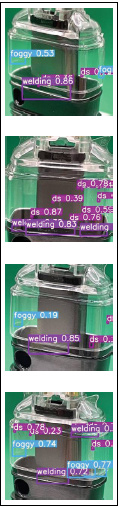
Good precision and recall rate actually depend on how precise the images in dataset are tagged and boxed. Here is my example application showing four categories of issues or defects:
• Welding issue
• Scratch and debris
• Foggy
The evaluation result showing confidence level once the defect is being identified and classified. Below are a few images after prediction is done over the dataset. Inferencing, the other name of prediction, can be done instantly within few mini seconds basing on the YOLOv5S model being used. The photos shown below provide the defect classifications, confidence level of AI inferencing, and the corresponding boundaries of the classified defect.
Adapting to your product
For a particular product with own defect classifications, data and quality engineers work together to pre-define visual defects that shall be tracked over volume production. Imagine we are using a thermal camera or an X-ray machine, we can capture more meaningful information with respect to the product defects to be tracked. The application can be extended further to suit special needs in different workplaces where pure reliance on human workforce is not appropriate, and tight measures on reliability and consistency are required. The usual inferencing rate can be around 1000 pieces in an hour, talking about end-to-end 3 to 4 seconds processing time per sample inspection.
Migrating from Cloud to Edge
While deploying the AI model in cloud will certainly incurring costs, Google and AWS will charge basing on the compute resources, storage resources or no. of images being processed for classification of defects. Hence moving out of cloud back will be the next step. The first choice is the hybrid approach. By purchasing and deploying a special edge device like AWS Deeplens, we can directly put the trained AI model in production mode and execute it locally in the ATOM-enabled embedded system within Deeplens to ride on OPEX-free operation in defect inferencing while you can deploy immediately any trained models from your AWS cloud. The other choice is third party embedded system. I suggest NVIDIA embedded system Jetson Nano which runs on embedded Linux O/S and can deploy any trained models from AWS as well. At last we can also choose to setup a local computer without GPU for inferencing operation. This can be a generic setup under Window O/S or Linux O/S but there will be more installation of software to support the goal, including Anaconda3 for python notebook emulation.

Manufacturing Technology Insights Weekly Brief
Be first to read the latest tech news, Industry Leader's Insights, and CIO interviews of medium and large enterprises exclusively from Manufacturing Technology Insights
